Surface Evolver, without the terminal.
A native desktop app for macOS, Linux and Windows that wraps Ken Brakke's Surface Evolver C engine in one window: a datafile editor, the complete command language, and a live 3D viewer that follows your system's light or dark appearance.
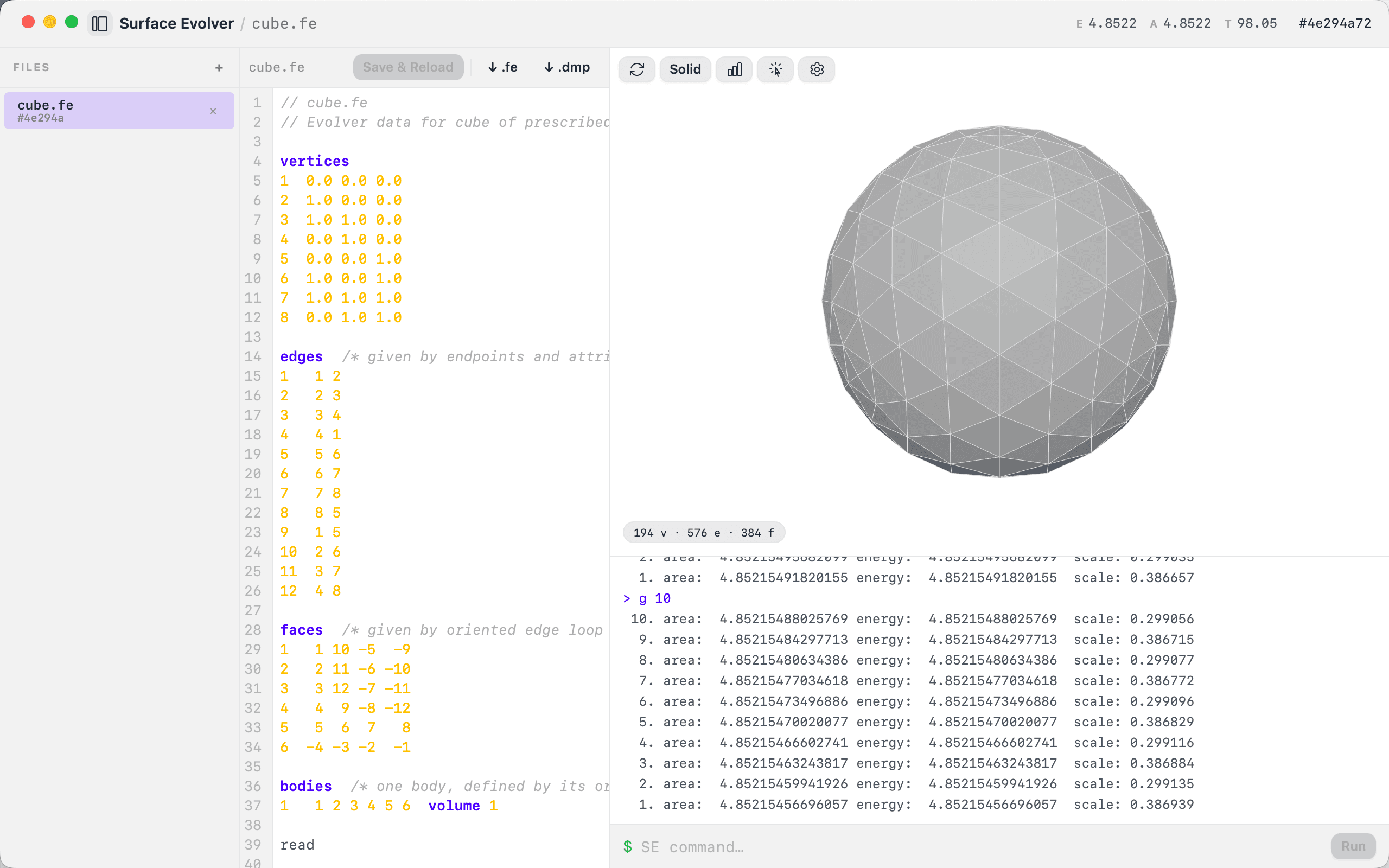
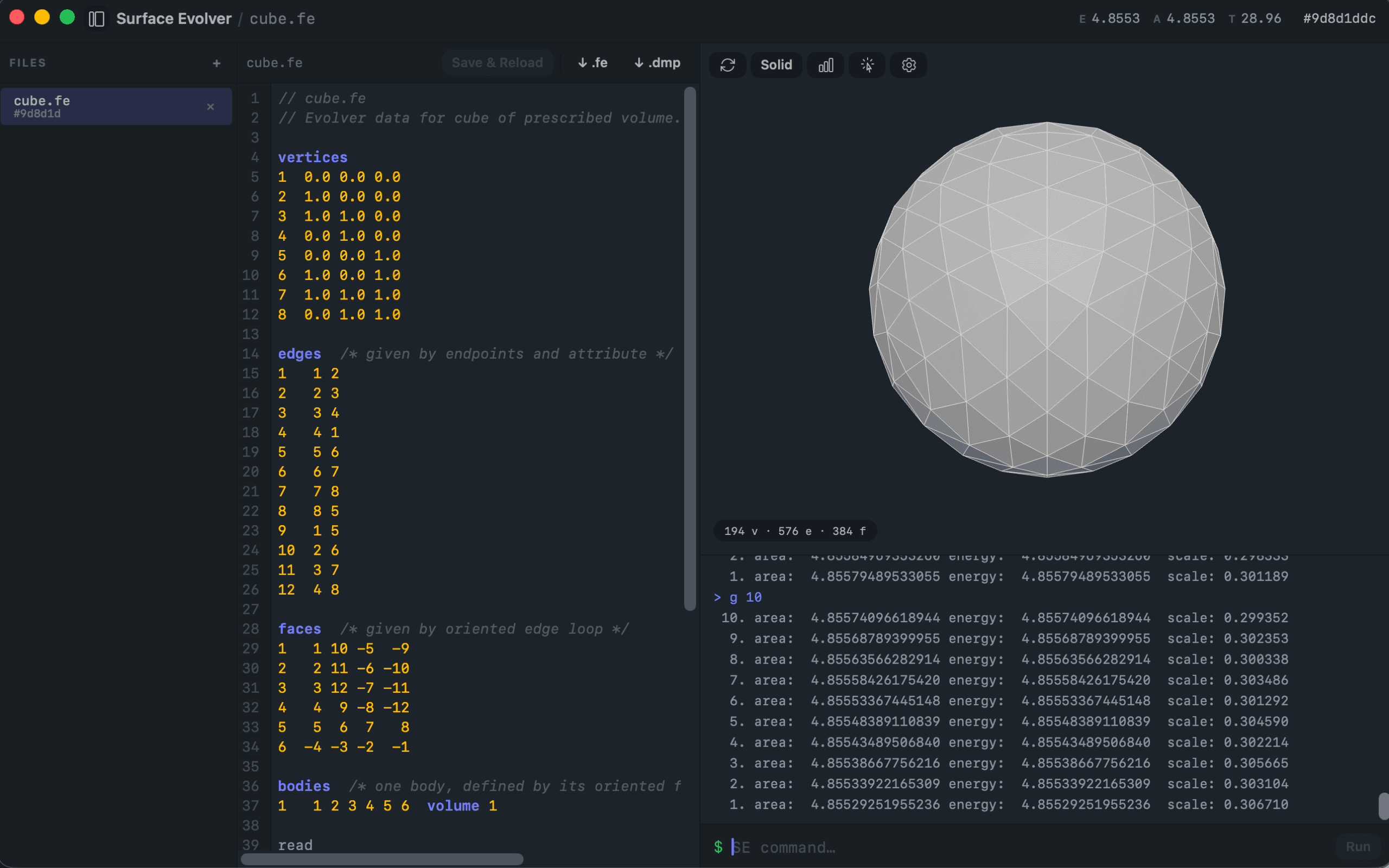
cube.fe refined three times and evolved to a sphere under its volume constraint — energy and area update live in the titlebar, mesh counts in the viewer.- 190k
- lines of C engine, unmodified
- 20 / 20
- bundled datafiles load and mesh, checked in CI
- 345 KB
- Rust worker sidecar
- 3
- platforms, rebuilt on every passing commit
Features
Everything the desktop app adds.
The engine's command language is preserved verbatim — nothing was taken away. What follows is what sits on top of it.
Live WebGL viewer
Three.js rendering with solid, wireframe and X-ray modes, Surface Evolver's own per-element colors, an edge overlay, orbit controls and an auto-fit camera, in a neutral light or dark theme that follows your system. The original ships an X11/OpenGL window many users never get working.
Periodic surfaces
Foam and crystal models wrap around a periodic cell. Edges that cross the cell boundary are hidden instead of drawn across the view — 103 of 368 in phelanc.fe — without the irreversible detorus. Facets that cross it still draw across the view in solid mode; that one is a known issue.
Syntax-highlighted editor
Edit the .fe datafile in place, then Save & Reload — change the geometry and run it again in one click, without leaving the app.
Click-to-inspect vertices
Click any vertex for its id, coordinates, constraints and attribute flags, plus body center-of-mass markers. In the original this is a print statement and a wall of numbers.
Topology ops with feedback
Refine, equiangulate, vertex-average and pop from the Run menu or the keyboard — each reports element deltas, named topology counters (pops, edgeswaps, dissolves) and ΔE instead of raw text.
A real Stop button
A long g 100000 can be stopped mid-run. Stop ends the engine process, so the app and the tab stay open; the surface in memory goes with it, and reopening the file starts it again.
Crash isolation
The engine runs in a separate process. A segfault or an exit() on an unrecoverable error costs you a session, not the application.
Session auto-restore
The surface is snapshotted in the background after every command that changes it, so relaunching the app brings back your evolved state, not the original datafile. Restore happens at launch.
Library in, exports out
20 example datafiles, all of which load in one click — plus upload of your own .fe files and export of the current surface as .fe or an exact-state .dmp.
Workflow
Three steps. One window.
Load a file on the left, edit it in the middle, run commands and watch the surface on the right — no terminal, no X11, no second program.
Load a surface
- 20 bundled .fe examples — cube, sphere, catenoid, crystal, phelanc — all of which load
- Upload your own datafiles; one with the same name as a bundled file takes its place
- Open files as tabs; switching reloads the engine into a clean state
- Toggle the explorer with ⌘B
Drive the engine
- Syntax-highlighted .fe editor with one-click Save & Reload
- The complete Surface Evolver command language, verbatim
- Run menu: iterate ×10 ⌘G or ×100 ⇧⌘G, refine ⌘R, equiangulate ⌘U, vertex average ⌘E
- Stop ends a running command by stopping the engine process; the app and the tab stay open
Watch it evolve
- Three.js mesh with solid, wireframe and X-ray modes
- Surface Evolver's own element colors, edge overlay, auto-fit camera
- Click a vertex for id, coordinates, constraints and flags
- Energy and area update live in the titlebar, element counts in the viewer
Command language
Nothing was taken away.
Every command the original engine understands still works, typed into the same app that draws the result.
cube.fe > r
Vertices: 50  Edges: 144  Facets: 96  Bodies: 1  Facetedges: 288
cube.fe > g 100
  1. area:  4.90195578472321 energy:  4.90195578472321  scale: 0.358750
cube.fe > u
Edges switched in equiangulation: 0
cube.fe > print body[1].volume
1
cube.fe > eigenprobe 0
Eigencounts:    0 <,  0 ==,  49 >
- Soapfilm model only
- STRING and SIMPLEX datafiles are rejected at load with an explanation — neither model's cells can be drawn honestly by a triangulated-facet mesh. The engine still computes them; the command line still reaches them.
- Power features are CLI-only
- Hessian and eigenvalue stability analysis (hessian, eigenprobe, ritz), edgeswap, dissolve, jiggle, optimize, conj_grad, saddle. They work — there are just no buttons.
- No structured duplicates
- There are no physics or named-quantity panels: set gravity_constant 980, print body[1].volume and v already do the job. A second path is a second thing to keep correct.
- One live session at a time
- One engine per process, by design — that is what buys crash isolation and cancel-by-kill. Open files are tabs; switching reloads.
Download
Install it and open a surface.
Free, open source, Apache 2.0. No account, no compiler, no X11 — the engine ships inside the installer. Each installer is the latest build that passed the full test suite.
macOS
- Apple Silicon (arm64)
- WKWebView rendering
- Built on macOS 14
SurfaceEvolver-macos-arm64.dmg
Ad-hoc signed, not notarized — first launch needs right-click → Open.
Linux
- x86-64
- WebKitGTK rendering
- Debian / Ubuntu package
SurfaceEvolver-linux-x64.deb
Needs libwebkit2gtk-4.1 from your distribution's repositories.
Windows
- x86-64
- WebView2 rendering
- NSIS installer
SurfaceEvolver-windows-x64-setup.exe
Unsigned — SmartScreen will warn on first run.
Requires testing: the installer is built automatically with every release, but hasn't been verified on a Windows machine yet.
Prefer to build it yourself? The repository has the CMake + Cargo + Bun steps. It is a hobby project, not production-grade — if you plan to rely on it for research, test the functionality you need first.